Example (With Beat): http://www.mediafire.com/?m4amlmxa4bcdv01
Example (Raw): http://www.mediafire.com/?uud6i2wlzu89evd
Fun little experiment that popped into my head while listening to/studying the opera "Einstein On The Beach" by Steve Reich. Utilizes a phasing effect in a manner a bit different than Mr. Reich's. It will be detailed here:
First, a simple rhythm is chosen. It could be anything, but it will work best with asymmetrical beats: a 4-to-the-floor beat wont work very well. Due to this, I selected a common reggaeton beat:
OxxOOxOxOxxOOxOx
O = Beat
x = Rest
Now, I look at the number of beats (here there are 8 on each bar), so I chose, to create the phase, a sequence of the first 7 letters on the alphabet (ABCDEFG), which would create a phase of 1. I then "mapped" each the letters onto the beats. It is hard to explain, but simple in concept:
Beat: OxxOOxOxOxxOOxOx
Sequence: ABCDEFG
Results: AxxBCxDxExxFGxAxBxxCDxExFxxGAxBxCxxDExFxGxxABxCxDxxEFxGxAxxBCxDx
And so on. This results in a pattern which repeats every 128 objects. In order to add even more variation, I associated each letter with a pitch in my audio example above, to create an interesting phasing melody. By the way, I didn't mention earlier, but both of the above audiofiles should loop seamlessly.
This technique seems very adaptable/expandable, and I encourage you to try it if you'd like! Here is shorter example (no audio), using syllables of words instead of letters:
Beat: OxOOxx
Sequence: POSS-IH-BLEE-MAY-BEE (Possibly Maybe)
Results: POSSxIHBLEExxMAYxBEEPOSxxIHxBLEEMAYxxBEExPOSSIHxxBLEExMAYBEExx
A bit silly, but it may have possible applications in the future. Enjoy :)
Showing posts with label audio. Show all posts
Showing posts with label audio. Show all posts
Tuesday, August 7, 2012

Thursday, June 21, 2012
kilobeat
Another ChucK experiment! This one is more interesting, I think, and as a bonus, I kept the source code this time to share! :D
Here is the source: http://pastebin.com/nDAkvSKj
Yes, I know, it is terribly written code, but give me a break, I have been learning for less than a day :P
And, in case you do not have ChucK installed, here is an .ogg file recorded directly from ChucK, with no post-processing or edits: http://www.mediafire.com/?4w1g89x7g7i7pb7
There are five main ugens being utilized here: 3 Kaplus-Strong string synths, a pure Sine bass, and a low Sawtooth wave with a short release and a resonant low pass filter. Harmonics are where the pitches are generated, there is no midi or western pitches utilized here. It is called "kilobeat" because there are exactly 1024 beats in the entire piece. It generates sound for several minutes, and then ends with a droning sine wave, though technically, it is not ended but instead halted for a one week (!) period of time. So, if you are VERY patient, then there are more than 1024 beats ;)
The piece runs through many time signatures, with bizarre "swings" not possible for a human to play in time, as far as I know... Maybe Mike Patton could do it? :P
Wednesday, June 20, 2012
ChucK!
Link: http://www.mediafire.com/?1k7t3se32d24r9c
Just experimenting with ChucK, an experimental audio programming language which is quite different from Supercollider, from what I have seen so far. Feels a lot more low-level and experimental, not that either of those are a bad thing! :P
Now, on this particular piece: it sounds very random at first, but it's neat to hear the pitch and rhythm patterns start to emerge over time (there is no midi, and it's not on any one scale, it's mostly relying on the harmonics of other harmonics of a modulating fundamental). I let it run itself for a minute, then replaced the code with a modified version (in real time! yay livecoding!) which added another variable, s, which was increased slightly every time a note was played. This variable was added to the amount of time between note changes, which resulted in a piece which eventually slowed down to a near halt. Very fun :)
Saturday, June 9, 2012
rd(prog)
Here I am furthering the concept of ring modulation in conjunction with the Karplus strong synthesis method. It's a non-interactive patch, so everything you hear is being randomly generated. The supercollider code changes the length of the delay buffers at steady regular intervals and amounts to create a rudimentary "progression" of notes, though they aren't perfect and are definitely microtonal, if you have the ear for that. The progression is happening rather slowly though, so you may have to speed up the file to hear it better. Luckily, I did that for you!
normal speed: http://www.mediafire.com/?hyi2erl9nryb9e7
300~ percent speed: http://www.mediafire.com/?bdx4pbianmozad3
Enjoy! :)
Tuesday, May 15, 2012
humanoidvocalstudy04
Though I can't really go into depth, I will say that this required only a single 1 second buffer, with about 10 different play-heads moving along it at various speeds, as the buffer was being recorded to live, with feedback through an open speaker loop. Since almost everything you are hearing was made through processed live recordings of my voice, I must say that I will NOT be doing this again for a bit. It hurts your voice a lot :X
What is neat about this is that it was done entirely live, no post-processing, which means that this kind of buffer-based processing would work well in a concert setting; I should look further into this in the future :)
link: http://ge.tt/93l08iH/v/0
What is neat about this is that it was done entirely live, no post-processing, which means that this kind of buffer-based processing would work well in a concert setting; I should look further into this in the future :)
link: http://ge.tt/93l08iH/v/0
Tuesday, May 8, 2012
Still Here
Surprise! Not dead!
Link (lossless .wav format): http://ge.tt/9E0ITPH/v/0
Here we have a slightly modified version of the classic Karplus-Strong string synthesis, one of my favorite non-basic synthesis methods because of it's simplicity and flexibility. I incorporate a ring modulator into the initial impacts, and allow the impacts themselves to become more sustained and pronounced. I used no interpolation in any of the UGens, which caused many high up harmonics, which were later filtered out. There are four "strings" ringing, proportional to 200/300/400/600. A low pass filter was utilized. This was created entirely in Supercollider, with myself controlling ring modulation frequency and impacts (using a midi keyboard), but then the resulting file was edited in audacity, dropping the overall speed around 50 percent, so that the higher up harmonics would make themselves more known, and also filtering out the excessively high harmonics in order to make room for the lower drones.
Anyways, that's about all, sorry I haven't posted for a while, been very busy, but don't think I have forgotten about you! :D
<3 ac
Link (lossless .wav format): http://ge.tt/9E0ITPH/v/0
Here we have a slightly modified version of the classic Karplus-Strong string synthesis, one of my favorite non-basic synthesis methods because of it's simplicity and flexibility. I incorporate a ring modulator into the initial impacts, and allow the impacts themselves to become more sustained and pronounced. I used no interpolation in any of the UGens, which caused many high up harmonics, which were later filtered out. There are four "strings" ringing, proportional to 200/300/400/600. A low pass filter was utilized. This was created entirely in Supercollider, with myself controlling ring modulation frequency and impacts (using a midi keyboard), but then the resulting file was edited in audacity, dropping the overall speed around 50 percent, so that the higher up harmonics would make themselves more known, and also filtering out the excessively high harmonics in order to make room for the lower drones.
Anyways, that's about all, sorry I haven't posted for a while, been very busy, but don't think I have forgotten about you! :D
<3 ac
Tuesday, September 27, 2011
BOTB
Hey, just checking up and saying I am still here. Recently I joined a neat site called "Battle Of The Bits", it's pretty neat! Check out my account here.
And to see my latest submission, an experimental lofi drone piece using only the amen break and a sine wave sample (using supercollider), click here!
Enjoy! :D
And to see my latest submission, an experimental lofi drone piece using only the amen break and a sine wave sample (using supercollider), click here!
Enjoy! :D
Tuesday, June 14, 2011
Granular Synthesis Followup
I responded to the previous post with a more complex tutorial about granular synthesis, if any of you are interested:
Alright, Granular synthesis is much more modern (and complex!) than the other two synthesis types I mentioned...
Addative synthesis has been used in pipe organs for centuries, and Subtractive synthesis was what the first synthesizers (moogs in particular!) utilized (and it is also how we produce many sounds... Our lips act as primitive "filters" on the sound produced by our "oscillator", our vibrating vocal chords! Neat, huh?) :D
Granular Synthesis, however has only been around for 60 years, max. From what I understand, it was invented by a very talented composer named Iannis Xenakis.
He had this crazy idea that he could cut sounds into tiny little pieces called "grains", and then do things with them, to manipulate sound in ways that never had been before. Since this was early on, he had to record something (a violin, for example) with a tape recorder, cut the tape into teeny tiny little pieces, and reassemble them to form all new sounds. This, obviously, took a very very long time, and the results were not perfect, but very innovative.Here is a very early piece using granular synthesis, called Analogique A + B.
Anyways, back into the idea of what Granular synthesis is. Now-a-days, we have computers, much faster and larger than any back when granular synthesis was being developed, so we dont need to fumble around with tape recorders any longer, and we can even use this synthesis in real time, if we wish to do so. Unlike addative or subtractive synthesis, which are very consistent in concept, granular synthesis can be used in an almost infinite variety of ways, the main constant being that the sound is being methodically chopped into pieces called "grains". Past this, these grains can be manipulated, combined, edited, sliced into more grains, looped, effected, shifted in speed or pitch, or any combination of these or other methods... You can see why this is such an interesting field!
Because granular synthesis is so computation-heavy, most hardware synthesizers, even today, do not have it as a function (though some rather expensive ones do). However, granular synthesis can be easily done on a computer via software programs like Audiomulch, Kluppe, Reason, and so forth.
Ok, so that is neat and all, but what are some of the applications of granular synthesis? Well, before granulation existed, the only way to speed up a song would be to increase its "frequency", how fast the speaker plays the song through... The problem with this method is, it makes everything sound high pitched, like Alvin and The Chipmunks! The same goes for slowing down a sound, it could not be done without dropping the pitch to the point of sounding ridiculous. This would certainly not do for most serious modern day music producers, but luckily, granulation allows a simple method to speed up (or slow down) a song WITHOUT changing its pitch! How?
Well, lets say we wanted to make a 2 minute long song take up the space of one minute. The old way to do this would be to simply squish together the entire 2 minutes into the space of one minute, doubling the frequency of all the sounds in the song, and thus, doubling its pitch. However, what if we cut the 2 minute song into millions and millions of equal pieces, cut each of THOSE pieces in half. Half of the data of the song has been lost, resulting in a one minute long song becoming two minutes, but luckily, the pitch has stayed the same! Slowing down a song is the same method, in reverse: cut the song into millions of equally sized pieces, and then space them apart evenly over the time fame you want the song to fill. This allows the frequencies to stay intact throughout the stretch.
If you have ever used the "change tempo" function in the popular music editing program, Audacity, you are performing the exact type of granular synthesis that I just described!
The "change pitch" function works using granular synthesis as well, to change the pitch of a song/sound without changing its length... The millions of pieces the song are cut into are then sped up, the old fashion way, to create a higher pitch without effecting the song's length itself!
There are many other applications for Granulation as well, from small fixes on a damaged sound file, to creating beautiful sound textures and pad sounds out of completely different files, to just fucking with a song for the fun of it! There are nearly infinite applications of granular synthesis, many of which don't quite cover the scope of this tutorial, but if you want to learn more, I suggest checking out http://www.granularsynthesis.com/guide.php, which allows an in depth explanation of many concepts of granular synthesis, as well as links to software, publications, etc.
Let me know if I you have any questions, as it can be an very odd topic at times, but I hope I sufficiently explained the basic idea of it, and maybe stayed interesting throughout :)
Thanks again for reading! :D
Synthesis Tutorial!
I was on reddit, when I came across a post asking to explain the basics of digital audio synthesis... So I went a bit overboard and made a pretty nice introduction-to-synths post, and I thought I might want to post it here, in case it might be of use to any of my readers.
Note that it is only slightly edited, so if anything seems odd, keep in mind it was meant to be a response to a reddit users query.
Ok, now, Enjoy :)


Note that it is only slightly edited, so if anything seems odd, keep in mind it was meant to be a response to a reddit users query.
Ok, now, Enjoy :)
Hiya, I am a synthesizer enthusiast and noise musician, and I would be happy to write you a basic tutorial on how audio synthesis works, since most of the answers here will probably be more about the musical aspect of things, and less technical then it should be. Synthesizers can be complicated, but they are really really fun, and I hope this tutorial can help you understand how a synth works! :D
Ok, so, you can think of a synthesizer as an instrument that you build while you play it (yes, seriously!). So, synthesizers can have many, many sounds, and unless I know exactly what you are looking for, I can't tell you exactly what to do, but I will tell you this:
EXPERIMENT, TRY DIFFERENT THINGS, AND DON'T BE AFRAID TO MESS UP!!!
Not only is it insanely fun, but it helps you become better at understanding how to mold sound into what you want it to be, even if you dont understand technically what you are doing. Many synth players don't even know music theory, they simply understand their synth like the back of their hand, and then do what sounds good.
Alright, that aside, I will give you a basic tour of a standard synthesizer... It may get a little wordy, but this understanding is important!
ANATOMY OF A SYNTHESIZER
The standard hardware (analog) synthesizer has a collection of "modules", interconnected, to synthesize. In it's most bare basic form, it would be:
Oscillator(s) > Filter(s) > Effects
This is nearly the most basic synth that you will find, though it still has almost infinite possibilities! Let me explain these components:
OSCILLATORS
If you have ever seen people talking about recordings, or music, or what have you, you have probably seen this as a representation of a wave:

This is basically instructions for the speaker, in graph form, on how to make a sound called a "Sine Wave", the simplest of all sounds, a pure tone. The X axis in this graph is time, and the Y axis is the position for the speaker's membrane to be in at that specific time. If this confuses you, don't worry, just keep moving on, you will get it in time!
Highly technical aspects aside, the "Oscillator" is the sound-making unit of the synthesizer. Without the Oscillator, there would be NO SOUND. No other part of the synth actually creates sounds, it merely processes and changes the existing sound, created by the Oscillator. So, as you can see, the Oscillator is EXTREMELY important! The Oscillator can create many different sounds, but they generally sound very constant and toned, like the sounds made by old video game consoles. Here are some pictures of waveforms, the shapes these waves make, and explanations of what they sound like:
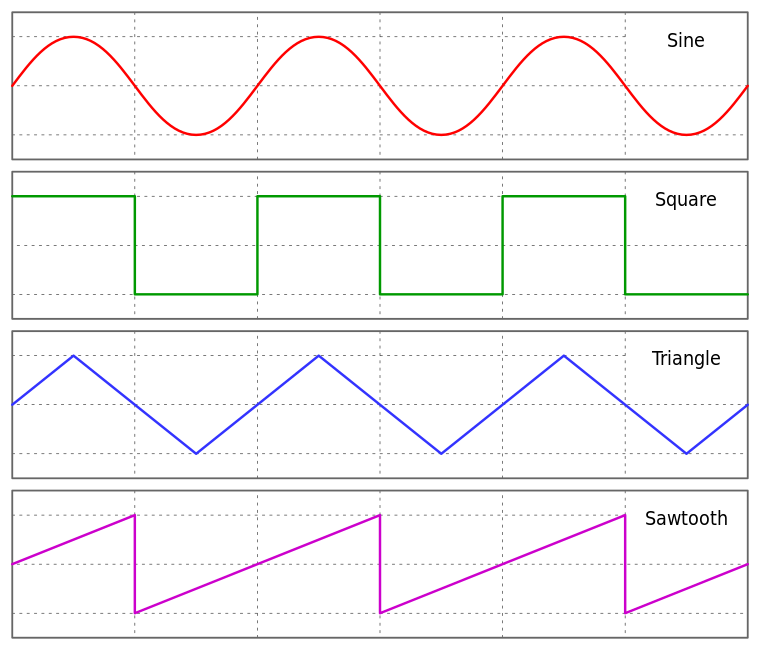
These are the most common periodic (toned) waveforms that you will find on your average synthesizer, though there are many many more out there. As you can see, they are often named after their wave's shape, but let me give you a few side notes on the properties of these waves:
- Sine waves, as I said earlier, are the purest a tone can possibly be. It has no "harmonics", or extra tones, which makes it sound very simple and smooth. It is used very much in additive synthesis, which will be explained later.
- Square waves are very harsh, and contain many harmonics, making it a good canidate for subtractive synthesis, which will also be explained in a bit. Pure square waves are a bit loud sounding, but have been used very often in classic videogames, such as the NES, which had a build in dedicated Square Wave synthesizer, which was used for well known game themes like the theme song to Super Mario Bros!
- Triangle waves are the least used of these 4, but they still certainly have their place! Several game consoles have used this as a substitution for a pure sine wave, because it is simpler to create, while still having a similar tone.
- Sawtooth waves, like Square waves, also have lots of harmonics, perfect for subtractive synthesis and filters. Sawtooth waves have a sort of "buzzing" sound
There is one more thing that basic oscillators can produce that I would like would like to go over, and that is, "Noise". "White Noise" is the most common, though there are almost infinite varieties out there. Unlike all the previous waveforms, white noise has no constant shape, and thus, no constant tone, either. You most likely already know what white noise sounds like, too! If you have not heard of it by name, try changing your television to a channel with no input, and you will see black and white dots and hear a sound like "SHHHHHH". That is noise! Noise is really good for filtering, and filtered noise waves can make really good percussion sounds, like snare drums or high hats.
METHODS OF SYNTHESIS AND FILTERING
Alright, now we have our electric piano keyboard plugged into our oscillator, and we are making tones and noise with these basic waveforms, on their own or in combination with each other, but it sounds a bit boring! What can we do to change these sounds to make them more interesting? Lets try using some classic synthesis methods!
There are several methods of synthesis in popular use, and unless you are using some very odd and obscure experimental synth, it will probably use one of the following, or a combination of these methods:
- Addative Synthesis
- Subtractive Synthesis
- Granular Synthesis
Granular Synthesis might be a bit too complicated for this explanation, but if I get a positive enough response, or you want me to explain it, I would be happy to put out the basics to you :)
So, what happens when we add two different waves or sounds together? We get additive synthesis!
Additive synthesis is done by adding very basic waves and sounds together to create more complex ones. This can be done with the oscillator, combining several, or many different waveforms, and playing them all at once, at different pitches and levels, or somewhere else on the synth, combining together hundreds of Sine waves to create entirely new shapes!
Here is a good visual representation of how additive synthesis works:

As you can see, three different sine waves, playing at different speeds, or pitches, are put together to create a whole new shape! Neat, huh? :)
What about subtractive synthesis? Well, I said something earlier about these things called "Harmonics". Harmonics are, basically, extra tones that add to the complexity of the sound of the waveform. Square Waves and Sawtooth Waves have lots of harmonics, Triangle waves have a few, and Sine waves have none at all! So, subtractive synthesis is using things called "filters" to manipulate the harmonics of a sound to create new tones.
We generally have several types of filters, and each of these have several parameters, or settings, that you can change. Don't get overwhelmed at how many there are, just absorb what you can, and play around with your own synth until you begin to understand them.
- Low-Pass Filter (LPF)
LPF's are filters that let only the harmonics lower than a certain point (the "cutoff" point) play, and reduces or eliminates all the harmonics higher than that point. LPF's can be used to make something sound "softer" or more "bass-y", and they are often used by dubstep producers to create a "wub-wub" sound, by moving the "cutoff" point back and forth very quickly (a process known as "modulation")
- High-Pass Filter (HPF)
HPF's are the exact opposite of LPF's, they work by keeping all the harmonics ABOVE a certain point, and quieting or eliminating the rest. They also have a cutoff point, just like low-pass filters, which is the point at which this cutting occurs. High pass filters can make things sound more tin-y, or they can be used to remove the bass frequencies from a sound
- Band-Pass Filter (BPF)
BPF's are like a combination of the two previous filters. They work by only letting a "band", a specific range of harmonics, through, and cutting off all the ones lower or higher than the this range. They have a wide variety of uses, experiment with it to see what you can use it for :)
- Equalizers
While not exactly a filter, per-say, Equalizers gives a synthesizer finer control over which harmonics you wish to emphasize, and which you want to quiet. Generally it gives you a variety of ranges, like "bass", "mid", and "high", and allows you to control each of them individually, enhancing or removing frequencies as you see fit.
These filters can be used to simply change the shape your oscillators can produce, or they can be "modulated", or have their parameters and settings (like "cutoff") changed over time, to create a more dynamic sound. This modulation can be done with an "envelope", a graph with an x axis of time and a y axis of value. Here is a visual example of a common envelope split into four sections, "attack", "decay", "sustain", and "release", also known as ADSR:

Envelopes can modulate other things, like how loud an oscillator is, or what it's pitch is, to create all sorts of neat possibilities. Fast envelopes can create percussive noises and hits, and long envelopes can create slowly morphing sonic textures, often known as "pads".
Parameters can also be modulated, believe it or not, with another oscillator! Dubstep producers, as I said earlier, create a "wub-wub" sound by modulating a low-pass filter's cutoff. This modulation is done via a very slow sine wave, moving the cutoff back and forth at a constant speed, in the same motion that the sine wave makes, up and down. This is usually called an "LFO", Low Frequency Oscillator.
Sorry if this is getting a bit complicated, like I said, just take in what you can, and experiment later on to see how different changes can effect the sound produced.
EFFECTS
There are thousands of different effects out there, and they can be very overwhelming, but just relax and try to wrap your head around a few of the most common (and most useful!) ones you will see, and their parameters (yep, effects have parameters too!):
- Delay/Echo
Delays take a sound created by your synth, play it, and then play it again at a later time, slightly quieter, and then repeat. This creates an echo effect. Some basic delay parameters would be "delay time" (how long it takes for the sound to be repeated) and "feedback" (how many times the sound is repeated, and how much quieter it gets on each repeat).
- Reverb
Reverbs create a spacious feeling, like making a noise or speaking in a large room or hallway. It gives the sound a more "live" atmosphere, and long reverbs can make a sound take much longer to fade than it would without the reverb. The most common reverb paramter would be "reverb time" (how long the sound is reverberating for)
- Flanger/Phaser/Chorus
These all work a bit similarly, but sound different. Without going into the highly technical features of these effects, they work by playing several copies of the same sound, all next to each other, at different speeds, to create different auditory effects. Flangers create an up-and-down wah type effect, phasers create a phasing sound often heard in alternative rock, and choruses make things sound more "wide", like a choir all singing the same note at different octaves. These effects generally have paramaters like "Delay time" and "Flange/Phase/Chorus Speed".
- Distortion
Many different types of distortion exist, but generally it makes the input sound harsher, noisier, and more intense. This effect is commonly used on guitars in rock music. Paramaters are generally simple, like "Distortion amount" and "Tone" (a built in equalizer that equalizes at the same time the distortion is performed).
- Equalizer
Remember this? Yep, some synthesizers consider this an effect, and not a filter. Weird, huh? It works well as both, though :)
END
Alright, at this point, your sound is sent from the effect to the speaker, and you have officially synthesized something! Yay!
I understand that audio synthesis can be tough to wrap your brain around, but if you managed to get your way through to the end of this tutorial, you already understand more about technical side of synthesis than many club DJs do! Cool!
Let me know if you have any questions at all about audio synthesis, and I would be happy to explain further, sorry if my explanations aren't perfect, I am not a teacher :s
Now, on the subject of buying synths, which I am sure many others have already covered... You have several options available, depending on your budget. There are hardware synths, which are special computers specially dedicated to synthesizing, which can range from 50 dollars for an old used casiotone, to hundreds of thousands for high quality moogs. You will have to look around, but I can vouch for the quality of Korg and Casiotone synths, if you'd like my opinion :p
Your other option would be software synthesis, which is using an existing computer (maybe the one you are on right now!) to synthesize things. There are many free software synths, one that I like would be ZynAddSubFX, which almost perfectly fits the scope of this tutorial, and has a build in virtual keyboard so you can use your normal computer keyboard like piano keys! You will have to explore to find other options, there are tons out there, have fun and look around!
Again, sorry if this didn't cover anything well enough, I hope it managed to help, though! :D
edit: added "distortion" to the effects list!
Saturday, April 23, 2011
Experimentation With Filtered Noise Signal
Using a resonant filter. It looks quite pretty in a spectrograph :)
http://www.mediafire.com/?atnu82mspaifhxq
http://www.mediafire.com/?atnu82mspaifhxq
Saturday, April 9, 2011
2 Other SC Projects
This one was all live coding, from start to finish: http://www.mediafire.com/?463m4ce7hgrrpty
This one was an experiment with the klang and klank objects: http://www.mediafire.com/?gi1ij41muop0mqa
Enjoy!
This one was an experiment with the klang and klank objects: http://www.mediafire.com/?gi1ij41muop0mqa
Enjoy!
Tuesday, April 5, 2011
SuperCollider Livecoding Session 1 Results
Thought i'd upload a quick livecoding session of mine. I didn't think to record it till the very end though, so this is just the final product, not the work leading to it. It runs for forever, but i only recorded a short snippet of it so you got the idea. Also, I forgot to save the sourcecode... sowwy :(
Enjoy the lil noises :)
http://www.mediafire.com/?ayedcq5wyvti78j
Enjoy the lil noises :)
http://www.mediafire.com/?ayedcq5wyvti78j
Thursday, March 31, 2011
DC Experiment
Sorry for not posting here for a while, just wanted to update to make sure you knew I wasn't dead, and show you a lil experiment i just did in about an hour. I wanted to see how DC offset could be used rhythmically, and here is my result:
http://www.mediafire.com/?856f8te935uzpua
I recommend listening to it once with headphones, once without, because of the low notes which change the experience. Also, check it out in a waveform editor like audacity, it is neato :)
http://www.mediafire.com/?856f8te935uzpua
I recommend listening to it once with headphones, once without, because of the low notes which change the experience. Also, check it out in a waveform editor like audacity, it is neato :)
Tuesday, March 15, 2011
dreamingonawonderfulcloud
yeah, anyone who can listen to this entire track with their headphones on full blast earns my respect (but i will not pay for the ear surgery). no input feedback loop, this time incorporating my diabolical first supercollider patch, which can seriously blow your eardrums if used incorrectly. its open source, so, uhh, here ya go:
SynthDef(\feedback, {arg delaylength=1, amp=1; Out.ar(0,DelayN.ar(In.ar(8,2),10,delaylength.lag,amp.lag))}).add;
{var feedback1, w, slid2d, csx, csy;
feedback1 = Synth(\feedback);
csx = ControlSpec(0.01, 9.95, 0, 0.01, 5);
csy = ControlSpec(0, 5, 0, 0.01, 1);
w=Window("No Input Feedback", Rect(600,300,200,200));
slid2d= Slider2D(w,Rect(5,5,175,175));
slid2d.action_({feedback1.set(\delaylength, csx.map(slid2d.x), \amp, csy.map(slid2d.y))});
w.front;}.value
and, the track:
http://www.mediafire.com/?g8hmy6bnnfv9ewl
(seriously folks, play this with the sound down REALLY low. it might damage your ears, or, even worse, YOUR EQUIPMENT!) :O
<3 artificialcuttlefish
SynthDef(\feedback, {arg delaylength=1, amp=1; Out.ar(0,DelayN.ar(In.ar(8,2),10,delaylength.lag,amp.lag))}).add;
{var feedback1, w, slid2d, csx, csy;
feedback1 = Synth(\feedback);
csx = ControlSpec(0.01, 9.95, 0, 0.01, 5);
csy = ControlSpec(0, 5, 0, 0.01, 1);
w=Window("No Input Feedback", Rect(600,300,200,200));
slid2d= Slider2D(w,Rect(5,5,175,175));
slid2d.action_({feedback1.set(\delaylength, csx.map(slid2d.x), \amp, csy.map(slid2d.y))});
w.front;}.value
and, the track:
http://www.mediafire.com/?g8hmy6bnnfv9ewl
(seriously folks, play this with the sound down REALLY low. it might damage your ears, or, even worse, YOUR EQUIPMENT!) :O
<3 artificialcuttlefish
Friday, March 11, 2011
amb143
a special, nearly half hour long feedback loop project. no input, lots of effects. check it out!
http://www.mediafire.com/?dvo3bfbniyh3h3o
i am really enjoying these, i am actually considering making an album of them :D
more on that later, maybe :3
http://www.mediafire.com/?dvo3bfbniyh3h3o
i am really enjoying these, i am actually considering making an album of them :D
more on that later, maybe :3
Wednesday, March 2, 2011
Lofi Keyboard Granulation Through Meapsoft
Heyo, haven't posted here for a bit, sorry bout that :(
I recently found a program called Meapsoft that's been all the rage with the kids these days, so I gave it a shot, and I gotta say it is awesome! Basically, it does the things it does in three main steps:
1. Cut the input soundfile into bite sized pieces (anywhere from 2 pieces to 50000) based on your instructions (either based upon beats per minute, which it detects automatically, or based on whenever it breaks a specific threshold and makes a noise).
2. Take the resulting lil pieces, and assign number(s) to them. What numbers, you say? Well, lots of different numbers! You get to choose, too! For example, I could choose to assign each lil piece we cut up in last step a number based on how loud it is. Or maybe I could base it in the overall pitch of the piece as a whole. Or maybe go even further, and assign each piece its entire frequency spectrum, assigning an array of numbers to each piece!
That is all well and good, but pieces with numbers are not very interesting... but now, we will see what those numbers are for!
3. Organize the pieces based upon the numbers we assigned in step 2! There is a large variety of ways to organize, just as there was a large variety of ways to numbers the pieces. For example, we could sort it in order of smallest to biggest, or from biggest to smallest, or we could scramble them by swamping them with other pieces with similar numbers; there are LOTS of possibilities, especially if you combine them with all the different ways you can number the pieces you are sorting!
It is really a very simple program, with great applications, and it is very fun to use. I recommend trying it yourself, and checking out the examples on their site.
Here are the results of me messing around for a while with a 5~ minute piece I played on a Yamaha keyboard, running through my distorted amp, running through a phaser and a few rack effects on my computer:
http://www.mediafire.com/?kk3jbp8vc8opi50
Enjoy!
Friday, February 18, 2011
DS String Plucking
An interesting plucked string emulation I made using my DS-10 as an analog emulating synthesizer... I quite like the results, and I really push the synth to its limits near the end of this 4 minute recording. The synth uses two channels, together emulating the impact and resonation of the string of a guitar or other stringed instrument. I am sorry that I forgot to document the exact values use, but if I do something like this again, I will try to remember :P
Recording, in 320 kbps mp3, here: http://www.mediafire.com/?q2fra1454d95b7c
Enjoy. Awesome collaborative bend coming soon. If you haven't already, check out my new side project, noisedaily.blogspot.com
<3
artificialcuttlefish
Recording, in 320 kbps mp3, here: http://www.mediafire.com/?q2fra1454d95b7c
Enjoy. Awesome collaborative bend coming soon. If you haven't already, check out my new side project, noisedaily.blogspot.com
<3
artificialcuttlefish
Wednesday, February 16, 2011
Yar's REVENGE (OF DOOM!!!!)
Ok, so now I have a favorite system to bend: Atari! I used to have a soft spot for Gameboy, but the simplicity and pure glitch-ability (yes, i made that word up) of the system makes it freaking PERFECT!
To give you an example, me and my friend, poke, over at http://intraocularypoke.blogspot.com/ made a BEAUTIFUL video showcasing all the work I did in my 4 glitches of the classic Atari game, Yar's Revenge! I hope you enjoy the wonderful video he made, visit his site for more of his work! I hope we can have more collabs in the very near future :)
Video:
Again, here is Mr. Poke's official website: http://intraocularypoke.blogspot.com/
And, here are the ROMS, for those who would like to experience them for themselves. These roms were all hand bent with love, and I really do hope you enjoy them: http://www.mediafire.com/?7doygg40e8y1i3q
And, if you need an emulator to play the roms, I HIGHLY recommend the awesome, multiplatform emulator known as Stella
Finally, take a look at the awesome cover poke also made me!

To give you an example, me and my friend, poke, over at http://intraocularypoke.blogspot.com/ made a BEAUTIFUL video showcasing all the work I did in my 4 glitches of the classic Atari game, Yar's Revenge! I hope you enjoy the wonderful video he made, visit his site for more of his work! I hope we can have more collabs in the very near future :)
Video:
Again, here is Mr. Poke's official website: http://intraocularypoke.blogspot.com/
And, here are the ROMS, for those who would like to experience them for themselves. These roms were all hand bent with love, and I really do hope you enjoy them: http://www.mediafire.com/?7doygg40e8y1i3q
And, if you need an emulator to play the roms, I HIGHLY recommend the awesome, multiplatform emulator known as Stella
Finally, take a look at the awesome cover poke also made me!

Monday, February 14, 2011
Lossyness, Part 2: MP3
This time, a very short experiment in the lossy audio format, mp3. A simple "Amen Breakbeat" has been looped, and each time it loops an extra level of compression/optional downsampling is applied to the beat. The results are quite interesting, the final steps being very difficult to hear due to low frequency response. To save you some times in downloading, I have mixed the entire collection of breaks into one high bitrate mp3 file; Keep in mind that, despite the lower rate tracks have been resampled to a higher rate, rest assured that the distortion to the sound is kept intact.
Download the compressed goodness here: http://www.mediafire.com/?eab7jclhrwgvq75
Enjoy!
Download the compressed goodness here: http://www.mediafire.com/?eab7jclhrwgvq75
Enjoy!
Ate
My newest feedback piece. Sorry, no diagrams for this, these loops are getting bigger and bigger. I added several effects, an equalizer, and a pure data patch into the cycle. This is my favorite one so far!
Download here: http://www.mediafire.com/?oo2g6v9yiu5ak9t
Download here: http://www.mediafire.com/?oo2g6v9yiu5ak9t
Subscribe to:
Posts (Atom)